Using a VPN to manage your PayPal account as a non-resident sounds like the logical move — but it can get your account flagged or limited. A static residential IP gives PayPal the consistent, trustworthy signal it needs without tripping fraud detection.
The Quick Answer
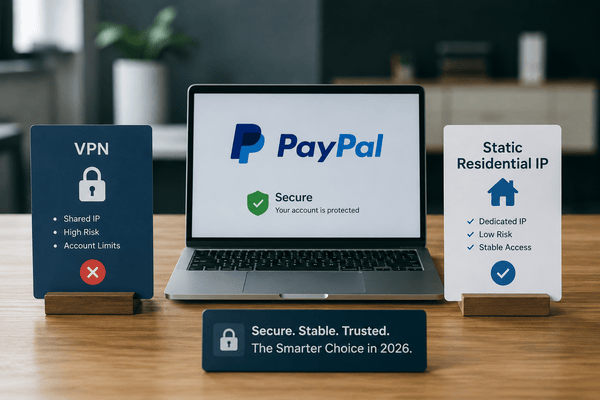
For non-residents using PayPal, a static residential IP is far safer than a VPN, because it mimics a real home connection rather than triggering PayPal's fraud filters. VPNs rotate IPs and route through datacenter servers — both red flags for PayPal. A dedicated residential IP stays consistent, lowers your risk of account flags, and supports managing multiple PayPal accounts when used correctly.
Static Residential IP vs. VPN vs. Datacenter Proxy: The Basics
Here's the plain-language breakdown of your three options:
- Static residential IP proxy: Gives you a real, fixed IP from a genuine home network — like logging in from your own place every time. PayPal sees it as stable, natural, and trustworthy.
- VPN (Virtual Private Network): Bounces your connection across different servers, so your apparent location changes often. PayPal notices that shift and treats it as suspicious.
- Datacenter proxy: Comes from server farms, not homes. Fast, but unreliable and frequently shared or recycled. PayPal doesn't trust these either.
The takeaway: if you're serious about keeping your PayPal account safe, a static residential IP is the clear choice — no question about it.
Why VPNs and Datacenter Proxies Put Your Account at Risk
VPNs and datacenter proxies look easy and affordable on the surface, but here's the catch:
- Your IP changes constantly.
- PayPal detects those changes almost instantly.
- Your account gets flagged, limited, or locked out.
You might suddenly be asked for identity verification even though nothing else about your account changed. In the worst case, your account gets frozen or permanently limited. That's exactly why we tell clients: don't risk it.
Why Static Residential IPs Are the Safer Choice
With a static residential proxy, your IP stays the same and appears to come from a real, lived-in location. PayPal reads that as normal activity. Specifically:
- Your login location doesn't jump around.
- It mimics a real user's behavior.
- You avoid the red flags that trigger fraud reviews.
If you can get a proxy locked to a fixed zip code, even better — that extra layer of consistency is exactly what PayPal's systems look for.
Managing Multiple PayPal Accounts the Right Way
You can manage more than one PayPal account, but it has to be done carefully:
- Always clear your cookies and cache before switching between accounts.
- Leave at least 24 hours between IP switches for different accounts.
That 24-hour gap doubles as a built-in explanation if PayPal ever asks questions — you can honestly say the change was due to travel. And here's the golden rule: never use the same proxy for two accounts at once, and never switch proxies too quickly. Is Switching Between VPNs and IPs Risky? Absolutely. Jumping from one VPN to another, or flipping IPs too fast, is a red flag waiting to happen:
- It links your accounts together behind the scenes.
- It triggers PayPal's fraud detection system.
- It can get you banned, even if your account activity is completely legitimate.
The fix: stick to one static residential IP per account, and follow the 24-hour rule if you ever have to switch.
Best Practices for Non-Residents Managing PayPal
Most people check PayPal from their phones, but that's actually the riskier habit here:
- VPNs on phones are far less stable.
- Managing cookies and sessions is much harder on mobile.
We always recommend setting up your proxy on a laptop with a portable browser instead. You'll get more control, better stability, and a safer account long-term. If your business depends on PayPal, it's worth setting this up correctly from day one.
Static IP vs. VPN: Side-by-Side Comparison
| Factor | Static Residential IP | VPN |
|---|---|---|
| Location stability | Always stays the same — fixed and reliable | Changes often — routes through different servers |
| Network type | Comes from a real home connection | Shared datacenter or public servers |
| Trust level (to PayPal) | High — looks like a real user | Low — PayPal often flags due to inconsistent activity |
| Risk of account issues | Very low if used properly | High — can trigger account limitations or suspensions |
| Best for | Managing PayPal, online banking, business logins | Casual browsing, streaming, basic privacy use |
Before You Buy: What to Watch Out For
Not all IP proxies are created equal. Keep these guardrails in mind:
- Don't fall for free VPNs — they're unstable and often already flagged.
- Avoid cheap proxy providers. You get what you pay for, and it could cost you your account.
- Always research providers and check whether they offer fixed zip code IPs — that detail makes a real difference.
Quality matters here. Your PayPal account is worth protecting.
Key Takeaways
- VPNs rotate IP addresses — PayPal treats this as suspicious activity and may flag or limit your account.
- A static residential IP mimics a real home internet connection, giving PayPal consistent trust signals.
- Datacenter proxies are the riskiest option for PayPal — most likely to get blacklisted.
- When managing multiple PayPal accounts, clear cookies between sessions and wait 24 hours between IP switches.
- Non-residents need a US LLC or C-Corp, an EIN, and a US bank account to fully qualify for a PayPal Business account.
Final Thoughts
Managing a PayPal account from abroad doesn't have to be risky or stressful. With the right setup, you can use your account confidently, without worrying about limits, flags, or bans. Your IP is more than just a number — it's your digital footprint. Make sure it's stable, clean, and consistent. That's exactly why we recommend static residential IP proxies: they work, and they've helped our clients stay safe, smooth, and successful. Need help picking the right setup? Cloudtech helps international entrepreneurs form US companies, get EINs, open US business bank accounts, and set up PayPal Business or Stripe accounts — all without traveling to the US. Just reach out to us.
Frequently Asked Questions
Can I just use a VPN if I already have one?
Technically, yes, but we don't recommend it. VPNs change your IP often, and PayPal treats that as suspicious. Even if it works for a while, it could lead to limitations down the road. Why take that risk?
What makes a static residential IP different from a regular proxy?
A static residential IP comes from a real home internet connection, meaning it looks natural and trustworthy to PayPal. Regular proxies, especially datacenter ones, don't have that "real user" look — and that's exactly what PayPal flags.
Can I manage multiple PayPal accounts from one IP?
Yes, but do it right. Always clear your cookies and cache between accounts (consider using separate portable browsers for multiple accounts), and give it at least 24 hours between switching IPs. That way, if PayPal asks, you can say you were traveling — a legitimate, believable explanation.
Is it safe to use mobile VPNs for PayPal access?
Honestly, no. Mobile VPNs are even more unstable than desktop ones. If you're serious about protecting your PayPal account, set up your static IP proxy on a laptop or desktop instead — your account is worth the extra step.
Are free or cheap proxies okay to try first?
Short answer: don't. Free or ultra-cheap proxies are usually overused, unstable, or already blacklisted. They might look like a bargain, but they're risky and could cost you your account. Check the proxy's health before using it, and stick with a trusted provider offering fixed-location IPs.
What's this about fixed zip codes — why does that matter?
Some top-tier proxy providers offer IPs locked to a specific zip code. That consistency builds even more trust with PayPal — it's like saying, "I log in from the same spot every time," and PayPal's systems respond well to that.
What if I've already used a VPN — am I doomed?
Not at all, but you should make the switch now. Clean your cookies, use a portable browser, set up a proper static residential IP, and give your account time to stabilize. The sooner you start building trust with a consistent IP, the better.