What a Registered Office Address Actually Does
Your registered office address is the official destination for every letter Companies House, HMRC, and other government bodies send your company. It must be a physical UK address that's publicly listed, so legal notices and statutory mail never go missing. Getting it wrong isn't just an inconvenience — it can mean missed deadlines, penalties, or worse. Beyond compliance, this address shapes how your business looks to the outside world. It's a legal requirement at incorporation (no address, no registration), it signals legitimacy to customers and partners, and it keeps you connected to time-sensitive HMRC correspondence you genuinely cannot afford to miss.
The 2024 "Appropriate Address" Rule You Need to Know
Since 4 March 2024, every UK company must use an "appropriate address" as its registered office at all times. That means an address where documents will reliably reach someone authorised to act for the company, and where delivery can be acknowledged. A PO Box no longer qualifies on its own — if that's currently your registered office, update it now to avoid serious consequences.
- Must be a physical UK location — your home address works if the company is incorporated in the same jurisdiction (England & Wales, Scotland, or Northern Ireland)
- Requires sign-off from the company's directors before you file the change
- You'll need your Companies House authentication code to make the update online
- A third-party agent's address (such as Cloudtech's) is acceptable, provided it meets all the conditions above
Changing It Online: The Fast Route
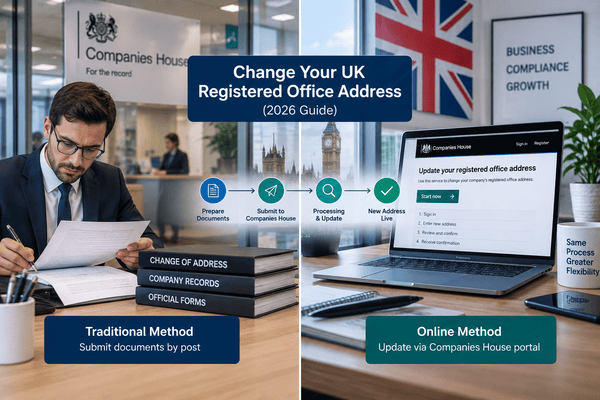
Most companies can update their registered office in minutes through the Companies House online portal.
- Sign in to "Find and update company information" with your Companies House email, password, and authentication code (register first if you don't have an account)
- Search for your company name
- Select "File for this company" and follow the prompts
- Enter your new address — search by postcode or enter it manually
- Submit. Companies House emails a confirmation within minutes
Changing It by Post With Form AD01
Some situations — including certain private limited companies or correcting an inappropriate address — require the paper route instead.
- Download Form AD01 from the Companies House website
- Complete it with your company name, registration number, and new address
- Add a short cover letter explaining the request (not mandatory, but helpful)
- Have a director or company secretary sign it
- Double-check everything, then post it to the address on the form
After You File: What Still Needs Doing
Once Companies House processes your request, the new address appears on the public register — but your job isn't finished. Update letterheads, your website, invoices, and any official documents immediately. Notify clients, suppliers, and partners so nothing gets lost in transit, and make sure the new address is reflected in your next Confirmation Statement (CS01). Note: every previous registered office address stays visible on the public record for the life of the company, plus 20 years after dissolution. If privacy matters to you, that's worth factoring in before you ever use a home address.
What It Costs
Changing your registered office online through Companies House is free. By post, you'll only pay for postage (more if you use recorded delivery). If you use a formation agent or third-party registered office service, expect a service fee. Want an old address removed from the public register entirely? That requires a separate application, and each document removed costs £30.
Choosing the Right Address
- Check your lease or mortgage terms — some prohibit using the property for business and require written permission first
- Remember the address is fully public; if privacy is a concern, a third-party or accountant's address with mail forwarding is worth considering
- LLPs follow a similar process (online or by Form LLAD01); Limited Partnerships must use Form LP6 by post, since no online option exists for them
If Companies House Flags Your Address
If Companies House determines your registered office is inappropriate, it will switch your company to a default address and give you 28 days to supply a valid one with evidence of your link to it. Miss that window, and your company risks being struck off the register.
Is Cloudtech's Registered Office Service Right for You?
Yes — Cloudtech's registered office service meets every UK regulatory requirement: a genuine physical location, accurate public record, and reliable mail forwarding so nothing important slips through. It's a straightforward way to stay compliant while protecting your privacy and strengthening your company's credibility.
Frequently Asked Questions
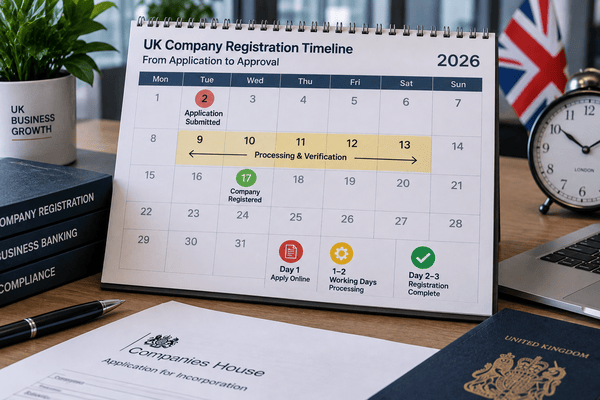
How long does the change take? By post, plan on 5–10 business days for Companies House to process your application. Through Cloudtech, it typically takes just 2–3 working days. How long to remove an old address from the public register? Generally 10–15 business days once your removal application is submitted. How do I know if my address has defaulted? Search the public register for a generic Companies House address, watch for default-address notices in your correspondence, confirm directly with Companies House, and double-check that any recent change was processed correctly.